
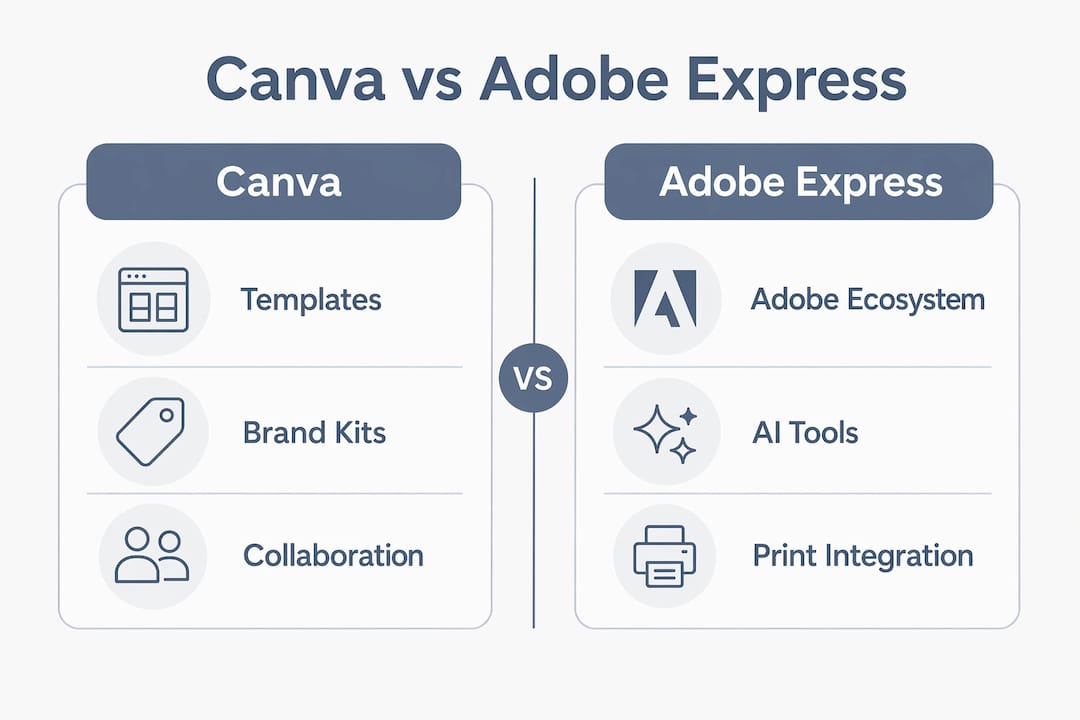
For most Brisbane restaurants, cafés and bars, Canva is the right starting point. It has a far larger template library, a near-zero learning curve, and built-in print ordering through Canva Print. Adobe Express earns its place when you need tighter typographic control, Firefly-quality image generation, or a clean handoff to a designer working in Photoshop or Illustrator.
- Canva: faster for high-volume social posts, event flyers and quick influencer assets; generous free tier; integrated print ordering for menus and posters.
- Adobe Express: stronger brand-kit enforcement, commercial-safe AI images via Firefly, and a natural fit if your team already pays for Creative Cloud.
If you're running influencer campaigns, launch events or need consistent content at volume, Bridge PR is the faster route than either tool alone.
Table of Contents
- How we compared Canva and Adobe Express for Australian venues
- What do Canva and Adobe Express cost in Australia?
- How do brand kits and templates compare?
- How do collaboration and team workflows differ?
- What integrations do each tool offer?
- Which AI features are worth using?
- Export formats and print specs for menus and posters
- Which tool suits common hospitality tasks?
- How do time-to-market trade-offs play out?
- How should you handle influencer content handovers?
- Should you hire a specialist or go DIY?
- What support can Australian users expect?
- How do offline editing and mobile apps compare?
- Data privacy, security, and Australian compliance
- Bridge PR: managed content for Brisbane venues
- Key takeaways
- FAQ
How we compared Canva and Adobe Express for Australian venues
Evaluation covered ten dimensions: best-for use case, ease and speed, templates, brand-kit control, team collaboration, integrations, AI features, export and print readiness, AU pricing, and mobile performance. Evidence came from hands-on testing of both tools, ZDNET's 2026 review, PosterWorks' poster-tool breakdown, and OnlineToolGuides' pricing analysis.
For hospitality venues, time-to-market and influencer-ready assets were weighted highest. Print specs (bleed, crop marks, high-res PDF) and brand compliance mattered for menus and posters. AU pricing was checked directly against each tool's Australian billing pages.
- Speed and templates — weighted highest for daily social and event content.
- Brand-kit control — critical for venues with strict visual identity rules.
- Print readiness — bleed settings, PDF export quality, and Canva Print availability.
- AI features — Firefly commercial licensing versus Canva's broader but capped AI tools.
- AU pricing — free-tier limits and paid plan costs in AUD context.
Pro Tip: Run both free tiers simultaneously. Use Canva for daily social and Canva Print for menus; use Adobe Express for any AI-generated image that will appear in a paid campaign, where Firefly's commercial licensing gives you cleaner legal footing.
What do Canva and Adobe Express cost in Australia?
| Canva | Adobe Express | |
|---|---|---|
| Best for | High-volume social, print orders, beginners | Adobe ecosystem users, brand-critical assets |
| Free plan | 1.6M+ templates, 5GB storage, 50 lifetime AI credits | 268,000+ templates, 5GB storage, 25 AI credits/month |
| Paid plan | Pro: ~AU$21.99/mo or ~AU$179.99/yr | Premium: ~AU$14.99/mo or ~AU$149.99/yr |
| Teams | ~AU$44.99/mo for first 5 users | No dedicated team plan |
| Included with CC? | No | Yes, free with any Creative Cloud subscription |
Canva's free tier is substantially more generous: it offers a very large number of templates with no watermarks. Adobe Express Free gives you a monthly reset of Firefly AI credits, free background removal, and transparent PNG export, whereas Canva's AI generation is limited by a lifetime cap. If your venue is on a tight budget and needs background removal regularly, Adobe Express Free saves you the cost of Canva Pro.
How do brand kits and templates compare?
Canva's brand kit covers logos, colours and fonts across the whole team and is easy to set up in under ten minutes. Adobe Express goes further: administrators can lock individual design elements so staff cannot accidentally change a font or shift a colour. For a multi-location group or a venue with a strict franchisor brand guide, that granular control matters. For a single-site café managing its own Instagram, Canva's system is more than enough.

Template volume is not close. Canva has a vastly larger free template library; Adobe Express has a smaller, more curated collection, which covers fewer niche formats. If you need a specific layout for a Brisbane food festival flyer or a weekly specials post, Canva almost always has something closer to ready-to-use.
How do collaboration and team workflows differ?
Canva supports real-time collaboration for multiple users and offers team plans with approval workflows. Adobe Express has shared projects but its simultaneous editing can lag when two people work on the same element. For a venue where the owner, a social media manager and a casual staff member all need access, Canva's team tools are noticeably smoother. Adobe Express suits a smaller creative team where one designer produces assets and others simply download them.
What integrations do each tool offer?
Adobe Express connects directly to Photoshop, Illustrator, Creative Cloud Libraries and Adobe Stock (350M+ assets on Premium). If a designer produces a Photoshop file, a marketer can open it in Express, make copy changes and publish without exporting anything. Canva integrates with Google Drive, Dropbox, Slack, Hootsuite and Meta's scheduling tools, which suits venues managing their own social calendar. Neither tool integrates natively with Australian point-of-sale systems like Lightspeed or Square, so menu updates still require a manual step.
Which AI features are worth using?
Canva's Magic Studio covers text-to-image, Magic Write for copy, Magic Eraser and background removal (Pro only). The catch: free-plan AI image generation caps at 50 lifetime uses total, not per month. Once exhausted, you hit the paywall.
Adobe Firefly resets 25 credits monthly on the free plan and produces higher-quality AI images with stronger prompt understanding. Critically, Firefly is trained on licensed content, which matters when you use AI-generated imagery in paid social campaigns or influencer briefs. For a Brisbane venue running Meta ads featuring AI-generated food imagery, Firefly's commercial licensing assurance is worth the consideration.
Export formats and print specs for menus and posters
Canva exports PNG, JPG, PDF (with bleed and crop marks on Pro), SVG, MP4 and GIF. Its built-in Canva Print service lets you order physical menus, posters and flyers directly from the design workspace, which removes the step of finding a separate Brisbane print supplier. Adobe Express exports PNG, JPG, PDF and MP4, plus transparent PNG on the free plan. It does not have an integrated print ordering service, so you export and upload to a local printer separately. For venues that print menus regularly, Canva Print is a genuine time-saver.
Which tool suits common hospitality tasks?
| Task | Better tool | Why |
|---|---|---|
| Daily Instagram and Facebook posts | Canva | Speed, template volume, scheduling integrations |
| Event flyers | Canva | More format variety, Canva Print option |
| Printed menus | Canva (Pro) | Bleed/crop marks, direct print ordering |
| Influencer asset briefs | Adobe Express | Locked brand elements, Firefly image quality |
| Designer-to-marketer handoff | Adobe Express | Creative Cloud Libraries, Photoshop interoperability |
| AI imagery for paid ads | Adobe Express | Firefly commercial licensing |
How do time-to-market trade-offs play out?
Canva's learning curve is around ten minutes for basic tasks. A new staff member can produce a usable Instagram post on day one. Adobe Express takes closer to 30 minutes to feel comfortable, and its advanced controls reward users with some design background. For a busy café where the owner is also the marketer, that gap is real. The hidden cost of Adobe Express is not the subscription; it is the extra time spent discovering where features live.
How should you handle influencer content handovers?
Whether you use Canva or Adobe Express, the handover process for influencer collaborations needs a clear structure. A practical workflow:
- Lock brand colours, fonts and logo placement in a brand kit before sharing any template.
- Create a dedicated shared folder (Canva) or shared project (Adobe Express) for each influencer or campaign.
- Export final assets as high-res PNG or PDF; never share editable files unless the influencer has agreed to brand guidelines in writing.
- For paid campaigns using AI-generated imagery, use Adobe Express and Firefly to keep commercial licensing clean.
- Brief the influencer on caption tone and hashtags separately from the visual assets.
Adobe Express's element-locking is particularly useful here: you can share a template where the logo and colour fields are fixed, and the influencer only edits the copy or image swap.
Should you hire a specialist or go DIY?
DIY with Canva or Adobe Express makes sense when you have at least one person who can dedicate two to three hours per week to content, a clear brand asset folder (logo files, fonts, colour codes), and a consistent posting schedule already in place.
Hiring a specialist makes sense when content production is inconsistent, influencer relationships need managing, or you want campaign-level strategy rather than individual posts. The real cost of DIY is not the tool subscription; it is the time spent on content that could go to floor operations, and the opportunity cost of campaigns that never get planned because no one has capacity.
A quick checklist before deciding:
- Do you have brand assets ready (logo in PNG/SVG, hex colour codes, font files)?
- Can someone on your team commit to content consistently, not just when it's quiet?
- Do you have existing influencer contacts, or would you need to find and vet them?
- Are you running paid social campaigns that need creative strategy, not just graphics?
If three or more of those are "no," a managed service is likely faster and cheaper than the accumulated hours of DIY.
What support can Australian users expect?
Canva offers 24/7 live chat and email support, with a well-documented help centre. Response times for Australian users are generally within a few hours. Adobe Express support runs through Adobe's broader support system, which includes chat, phone and community forums. Adobe's enterprise and Creative Cloud subscribers get priority support. For a small venue on the free plan of either tool, community forums and help articles are the primary resource, and both are thorough.
How do offline editing and mobile apps compare?
Neither tool offers true offline editing in the browser. Canva's iOS and Android apps are rated highly and allow most design tasks on mobile, including template editing and publishing directly to social platforms. Adobe Express's mobile app is functional but slightly less intuitive on smaller screens, with some features requiring extra navigation steps. For a venue owner posting from a phone between service periods, Canva's mobile experience is noticeably smoother.
Data privacy, security, and Australian compliance
Both tools store data on overseas servers, which is relevant under the Australian Privacy Act 1988. Canva (headquartered in Sydney) is subject to Australian law and publishes a Privacy Policy aligned with the Australian Privacy Principles. Adobe operates under its global privacy framework and is compliant with major international standards including ISO 27001. Neither tool is certified under the Australian Government's Protective Security Policy Framework, which only matters for government clients. For a private hospitality business, both are appropriate. Review each tool's data processing agreement before uploading customer data or proprietary brand assets.
This article is general information, not legal or privacy advice. Confirm current compliance requirements with a qualified Australian privacy professional for your specific situation.
Bridge PR: managed content for Brisbane venues
If the DIY checklist above flagged gaps, Bridge PR is the alternative to spending hours in Canva or Adobe Express and still not getting consistent output.
Bridge PR runs monthly subscription packages for Brisbane restaurants, cafés and bars: social content creation, influencer and micro-influencer campaign management, venue positioning strategy, and launch event campaigns. The difference from a tool is that you get a full content operation, not a blank canvas. Influencer matchmaking, creative briefing, brand governance and high-volume post production are handled for you, so your team stays on the floor.
For venues that need credible, local content that actually drives bookings and recommendations, Bridge PR's hospitality packages are worth a conversation. Get in touch to find out which subscription tier fits your venue's size and goals.
Key takeaways
Canva is the faster, more accessible tool for most Brisbane venues; Adobe Express earns its place for brand-critical assets, Firefly AI imagery, and Creative Cloud handoffs.
| Point | Details |
|---|---|
| Canva for volume | Over 1.6 million free templates and a ten-minute learning curve make it the default for daily social content. |
| Adobe Express for brand control | Element-locking and Firefly's commercial-safe AI give it an edge for influencer briefs and paid campaign assets. |
| Free plan difference | Canva's AI image generation caps at 50 lifetime uses; Adobe Express resets 25 Firefly credits monthly. |
| Print ordering | Canva Print lets venues order menus and posters directly from the design workspace; Adobe Express requires a separate supplier. |
| Bridge PR option | For venues without internal content capacity, Bridge PR's subscription packages cover strategy, influencer management and production. |
FAQ
Is Canva or Adobe Express better for beginners?
Canva is easier for beginners, with a near-zero learning curve and over 1.6 million free templates. Adobe Express takes around 30 minutes to feel comfortable and rewards users with some prior design experience.
Which tool has the better free plan for a small café?
Canva's free plan offers more templates and stock assets, but its AI image generation caps at 50 lifetime uses. Adobe Express Free resets 25 Firefly AI credits monthly and includes free background removal, making it stronger for venues that need sustainable free AI features.
Can I use both Canva and Adobe Express together?
Yes, and many hospitality teams do. Use Canva for daily social posts and print orders, and Adobe Express for AI-generated imagery in paid campaigns or designer handoffs where Firefly's commercial licensing matters.
When does it make sense to hire Bridge PR instead of using either tool?
When your venue lacks consistent internal content capacity, needs influencer campaign management, or wants strategic creative direction rather than individual graphics, Bridge PR's subscription packages are a more efficient use of budget than DIY tools.
Does Adobe Express work with Australian print suppliers?
Adobe Express exports high-res PDF and PNG files compatible with most Australian print suppliers, but it has no integrated print ordering service. Canva Print handles direct ordering from within the design workspace, which removes the extra step for venues printing menus or posters regularly.